Raspberry Pi Running Kernel-7.0.5
Raspberry Pi Running Raspberry Pi OS With Kernel 7.0.5.
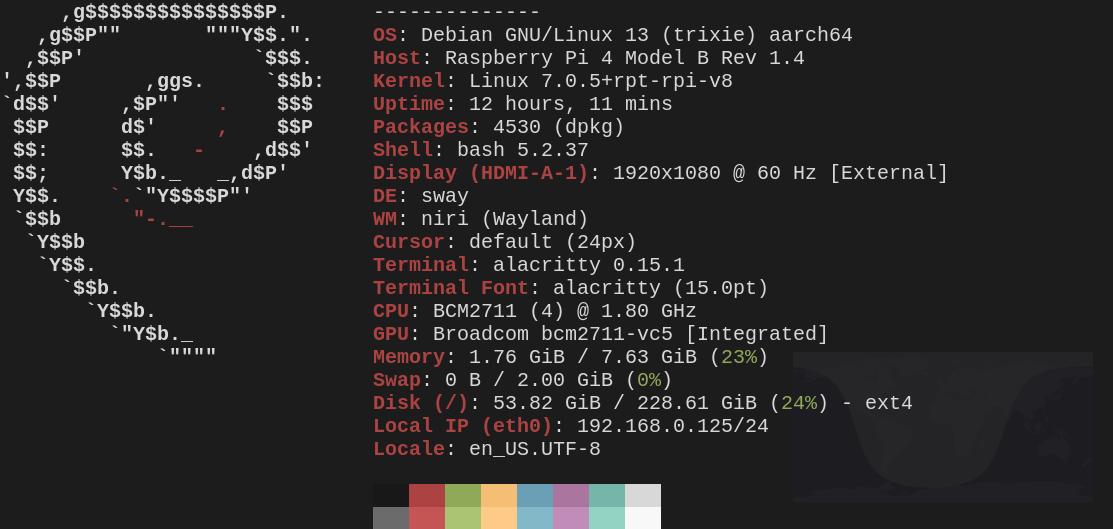
Fastfetch image of a Raspberry Pi running, the Raspberry Pi operating system with a custom built Linux kernel 7.0.5 which is, at the time of this writing, the latest stable kernel version.
It's probably not a big deal for many people, that the latest greatest Linux kernel can be run on the Raspberry Pi, I mean, if one were to install the ArchLinuxArm Operating system, which is the Arch Linux system which runs on Arm processors, one would easily enjoy the latest bleeding edge software, including the latest kernel version. However, This may not be the case on operating systems based on the Debian Gnu/Linux. Which is fine since Debian developers insist on having stability first. However, some of us like to experiment and tinker.
I must admit that earlier in my days of compiling these more recent, modern kernels for the Raspberry Pi devices, running Raspberry Pi OS did present some minor disturbances in the beginning. For instance, the process that I have been using to make these kernels are derived from the Official Raspberry Pi Documentation. However I've added another step in the process by building the deb packages for both the Linux image and its corresponding Linux Kernel headers. That is, after issuing the command, “make -j$(nproc) Image.gz modules dtbs” an additional command is issued to build the Debian deb packages with the command make -j$(nproc) bindeb-pkg.
After that one can just install the Debian deb packages with either apt or dpkg. Simple right? Well not exactly, because during the installation of the packages, there is a dpkg error which claims that the kernel is an unsupported one and therefore, while the kernel vmlinuz image is installed, initramfs-tools is unable to build the initrd image. That eventually causes problems in Raspberry Pi OS for some reason. Fortunately, I've found some workarounds. I'd rather not get into them but they now work flawlessly and since kernel version 6.12.85, another custom that I compiled, the situation has been rectified. If there are any souls who would like to know the workarounds, my email address is fivenineteen.at.netzero.net. My fediverse address is also [email protected] and my XMMP address is [email protected].
The workarounds aren't convoluted, they involve some substitutions in /etc/initramfs/post-update.d/z50-raspi-firmware, /etc/kernel/postinst.d/ commenting out the echo “+” line in the kernel sources, root directory, in scripts/setlocalversion, before issuing the commands “KERNEL=kernel8” and “make bcm2711_defconfig,” respectively and without the quotes please. I've decided not to include them here in this article, because, I doubt that there will be anyone who reads this, will even bother or care to mess around with their kernels anyway. However, if indeed I'm wrong in that assertion, then I have listed my contact information. It's a little hacky so I'll still have to think about how to present it to the masses in a concise and coherent manner, but so far it is workable. Honestly, I'm probably the only person who plays around with kernels anyway, so I don't expect much attention on the subject and I'm just putting it out here just in case.
That's all I have on this topic for now, but I await future updates in the kernel versions so that I may test them. As for this latest version, 7.0.5 which came out yesterday, May 8, 2026, I find it pleasurable, easy on CPU and RAM and everything appears to be working just as well as they did with the official kernel which was 6.12.75+rpt-rpi-v8 I find that things go along even more smoothly when I include the string +rpt-rpi-v8 as the kernel's local version. I figured this out when I needed to include BTF support. It was much easier to have the identical kernel naming as the one I was substituting. Obviously I and to switch the modules directory in /lib/modules too so that there would be correspondence. That was easy enough anyway since I did make bindeb-pkg. That's all for now, assuming anybody even read this post. Happy hacking if anyone did.